Data READs
Let's start with a newer version of ODATA to access data from a existing service, In this solution I have used Web API 2.2 with ODATA v4
ODATA v4 package
Visual Studio has a built in package to create ODATA v4 services, Package contains all the libraries required to create a ODATA v4 endpoint.
Integrate ODATA v4 package into solution
We can add the necessary OData package into solution like this, Select
Microsoft ASP.NET Web API 2.2 for OData v4.0
All the relevant libraries are installing
Register the OData endpoint
Register the service endpoint in
Register method of the WebApiConfig file
In line no 22, I have exposed the Student entity, Data read method is implemented in the
OData controller (StudentController)
Student Controller implements OData Controller
StudentController inherits from OData Controller, So all the CRUD operations can be implemented in this controller.
How it works in the browser
now ping to the OData endpoint,
We can see all the available entities in the endpoint with metadata
Read Students
By appending entity (Student) into url, we can read the student data
Read Data types
We can read the data types of student using the $metadata tag
Excel 2016 with OData v4
We already know office is not only for manipulating documents, We can perform many advanced queries with Excel.
Excel supports to fetch data from different other sources, newer update is OData sources
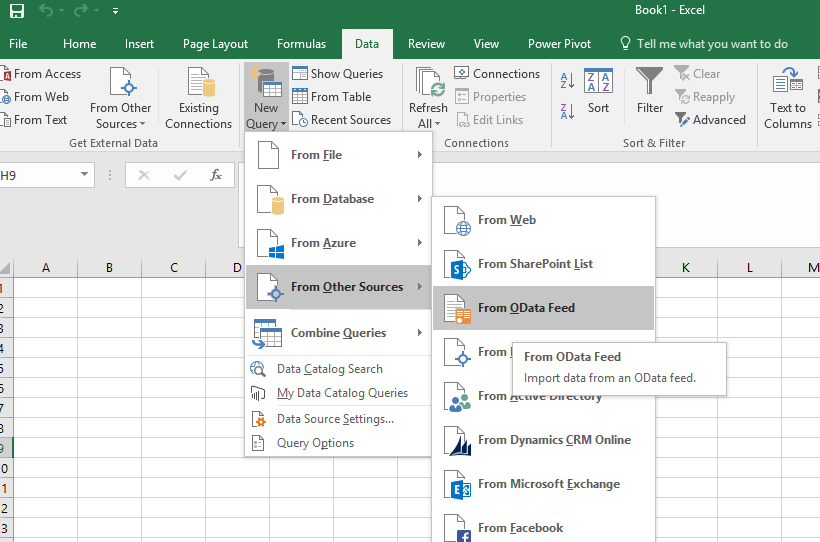
In excel 2016, We can connect to a OData source like this,
But we get an error!!!!!!
It clearly says OData v3 or any earlier data feeds only can be integrated with Excel 2016 :)
But, for your information,
With Office 2016 as well as the 2013, we can integrated OData v3
Excel 2013 & OData v4 ?
With Excel 2013, ODATA v4 is not compatible. But we can use a V3 format service with Excel 2013.
Excel 2016 with OData v4 - Power Query
With ODATA v4, we can't use ODATA source option, But we have Power Query option to analyse data.
In the Data tab, we have many options to fetch data from different other sources, We can select 'From OData Feed' option.
We can use Office 2016 Power Query option with OData v4.
Power Query Editor
This is the query editor, we can select/remove columns, can remove duplicates, group by a column, create a new column based on a mathematical function and much more advanced operations.
In the next section, we'll see how to read data by passing a value 😀